


Tap2Local™
Get Paid Easier
Tap2Local allows your local business to conveniently accept card payments directly from your mobile phone, eliminating the need for additional hardware.
New customer?


Running a business is hard work, but getting paid shouldn't be.
When you use a system that simplifies the way you accept payments, you can prioritize the work that matters. Focus on your business while we handle the rest.
When a customer’s ready to buy, all they have to do is tap. Tap2Local turns your smartphone into a terminal, accepting all major cards plus Apple® and Google wallets — so you can meet your community however they choose to pay.
To get started with Tap2Local, download the Crews Bank & Trust Mobile Banking app from either Google Play or the App Store by searching Crews Bank.
Support Built for Your Success:
-
Next-Day Speed: Get your funds quickly — cash flow shouldn’t be complicated.
-
Zero Hardware: Accept all major cards easily with just your phone.
-
Local Connections: Serve your neighbors with a single tap and keep that personal touch you’re known for.
-
Real Support: If you ever need help, you can talk to the real people you already know and trust.
How does it work?
Tap2Local uses mobile technology and card networks to facilitate payments for business. It allows three different payment options that gives you the flexibility that your business needs. Payment Links and QR codes provide the ability to support a card not present experience for the payer.
Tap to Pay
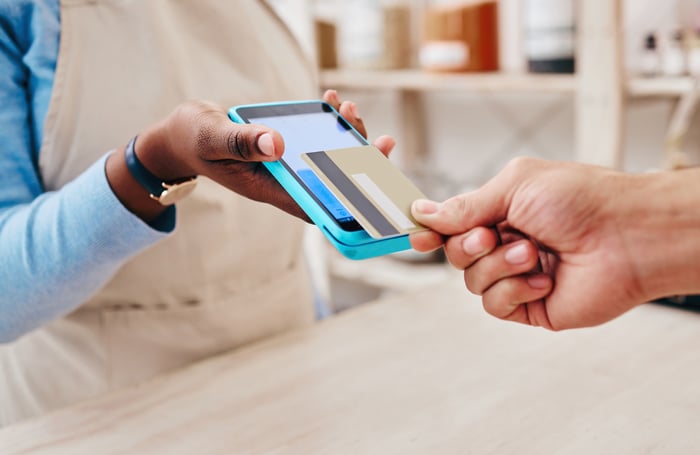
Your customers can tap their physical card or virtual card (Apple Pay, Google Pay) directly to your business's mobile phone.
Payment Links
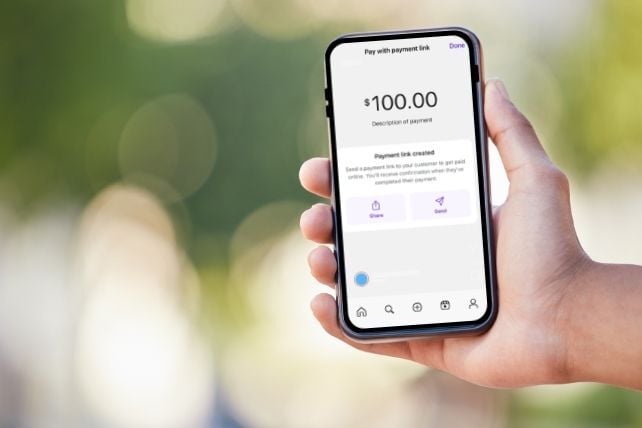
Generate and send unique payment links to customers that allow them to pay via their card in a web experience.
QR Codes
Share your payment link or QR code with your customers anywhere you interact with them - social media, your website, or even on printed materials.
Tap2Local supports all four card brands:
- Visa
- Mastercard
- American Express
- Discover
Functionality is fully available on both Apple iOS and Android.
Streamline payment processing and empower growth for your
business
/MobileDeposit.png)
Easy-to-Use, Hardware-Free Payment Solution
Accept payments anytime, anywhere with the phone already in your pocket. Traditional card terminals can be expensive, but Tap2Local has no hardware costs and offers simple sign-up through your Crews Bank & Trust Online Banking. Get set up instantly and start accepting payments right away – no paperwork or delays.
/Money-Transfer.png)
Simplify the Payment Workflow and Consolidate Banking
Tap2Local is designed to make it easy for businesses to receive payments
for goods and services in multiple ways. By consolidating payment acceptance, you can reduce complexity and tools required.
/Calculator.png)
Eliminate Manual Bookkeeping
Beyond just getting paid, Tap2Local automates the tedious task of balancing the books. Payments can be automatically reconciled with your accounting software, reducing manual errors and saving countless hours.
Tap2Local Frequently Asked Questions
Crews Bank & Trust is committed to providing exceptional service. Learn more about Tap2Local by browsing our most-asked questions and answers. If you don’t find what you need here, please reach out to us through the secure messages feature in the Crews Bank & Trust mobile app, or call or visit your local branch.
What do I do if I don’t see the option to use Tap2Local in my Crews Bank & Trust mobile app?
Are all businesses eligible to accept card payments?
Can I include my business logo in Tap2Local?
What do I do if I don’t see the option to use Tap2Local in my Crews Bank & Trust mobile app?
What payment methods are accepted?
How long will the settlement of transactions take?
How much does Tap2Local cost?
-
You will incur market-competitive fees:
In-person completed card payment fee: 2.60% + $0.15
Online completed card payment fee: 2.90% + $0.30
International card payments: 3.60% + $0.15
Card account update fee: $0.25
Dispute fee: $15.00
Completed RTP transaction fee: $0.30
Please note that these fees are as of April 1, 2026, subject to change.
Does the fee apply to both credit and debit cards?
Can payments be accepted with a prepaid Visa or Mastercard?
When a transaction settles, is it a single line item with fees already deducted, or are there two separate line items: one for the full amount and one for the fee?
Can the payment link or QR code options be used for recurring payments in addition to one-time payments?
Will Tap2Local come with a hardware component?
What devices or platforms are required to support Tap to Pay functionality? Does it support both iOS and Android?
Tap to pay for accepting card payments is supported on both Android and iOS devices. For iOS, devices must be iPhone XS or newer running iOS 16.7 or later. For Android, devices must be running Android 11 or higher with a functional NFC antenna and chipset. Additionally, payment links and QR codes are supported across Android, iOS, and web platforms.
How will disputes be handled?
Who does Crews Bank & Trust partner with to offer Tap2Local?
What security measures are in place to protect merchant and customer payment data?
Jack Henry and Moov provide several layers of advanced security for merchant and customer payment data. Sensitive information – such as bank details, card data, and PII –is protected with field-level encryption using rotating keys stored in hardware security modules (HSMs) that are inaccessible to individuals and restricted to authorized system processes. All data in transit is encrypted with TLS 1.2 or higher, both internally and externally. We enforce multi-factor authentication (MFA) and device fingerprinting for robust identity verification. The infrastructure includes physical network segmentation between a DMZ and a Secure Zone to further isolate critical systems. Moov also undergoes thorough third-party assessments, including annual SOC 2 Type II and PCI-DSS Level 1 audits, as well as internal and external penetration testing at least twice a year.






Download the Crews Bank & Trust Mobile Banking app from either Google Play or the App Store by searching Crews Bank.